Notifications
Configure EDFlow notification channels per site: push, patient and family text messages (Twilio), email (Resend), the generic lock-screen default, rate caps, sending a test, and clinical communication platforms.
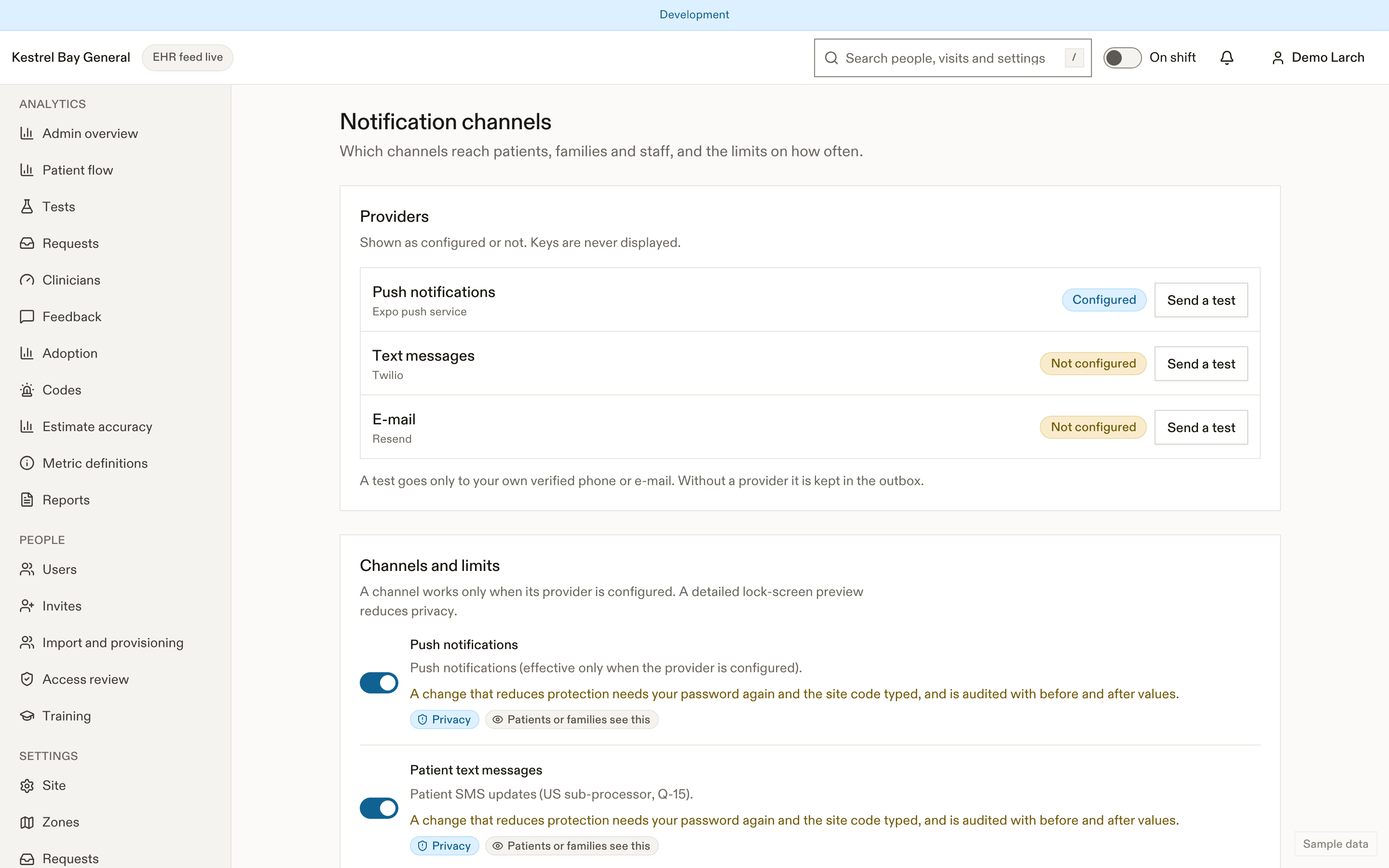
Channels
The page shows whether each provider is configured (push, text messages, email), read from the deployment's configuration without ever showing a key. Turn each channel on or off per site.
| Paramètre | Par défaut | Valeurs permises | Effet |
|---|---|---|---|
notifications.push | true | boolean | Push notifications (effective only when the provider is configured). (Réduit la confidentialité) |
notifications.patientSms | true | boolean | Patient SMS updates (US sub-processor, Q-15). (Réduit la confidentialité) |
notifications.familySms | true | boolean | Family SMS updates. (Réduit la confidentialité) |
notifications.email | true | boolean | Patient summary-link email. (Réduit la confidentialité) |
notifications.pushPreviewDefault | generic | generic, detailed | Default push preview (D-11). (Réduit la confidentialité) |
notifications.pushPerHour | 6 | 1–20 count | Push budget per patient per hour. |
notifications.smsPerDay | 3 | 0–10 count | SMS budget per patient per day. |
notifications.staffCodePush | false | boolean | Staff push when a code is called (D-38). |
notifications.staffBedInPush | false | boolean | Bed label in staff push text. (Réduit la confidentialité) |
notifications.brandedLabelApproved | false | boolean | The privacy office approved the branded SMS and push label (BR-13). (Réduit la confidentialité) |
What's sent
Every notification uses fixed, generic text: the lock screen says only "You have a new update." unless the patient chooses the detailed variant, and even that never includes a test name, a result or the hospital's name. Texts contain a link and nothing else. Codes never send texts or email. See Updates and notifications.
A detailed lock-screen default reduces privacy, so it needs a fresh sign-in check and typed confirmation.
Send a test
Send a test sends to your own verified phone or email only. When a provider isn't configured, the test goes to the outbox instead.
Staff notifications
The "Code called" staff push is off by default. Bed labels in staff push are off by default.
Clinical communication platforms
Optionally, forward urgent and high requests, escalations and unanswered call-backs to the hospital's clinical communication platform (Vocera, Spok, Ascom, Microsoft Teams, or generic HTTPS):
- endpoint URL (
httpsand public addresses only); - which events;
- the routing map from zones and pools to platform groups;
- whether "Going now" and "Can't go" come back;
- a signing key revealed once, Send a test, and delivery health.
Payloads carry no patient details.
| Paramètre | Par défaut | Valeurs permises | Effet |
|---|---|---|---|
messaging.patientFacingLabel | neutral | neutral, branded | Neutral or branded SMS and push label; branded needs brandedLabelApproval (BR-13). (Réduit la confidentialité) |
messaging.brandedLabelApproval | — | object | Recorded privacy approval for the branded label (audited). (Réduit la confidentialité) |
Related
Dernière mise à jour le
Cette page vous a-t-elle été utile?
Privacy and retention
Configure EDFlow privacy and access settings: patient and family access windows, sharing limits, the data profile, youth-confidential ages, results display delay, retention periods and de-identification.
Waiting-room display
Set up the EDFlow waiting-room display: public or key access, the official typical wait, slides, language mode, orientation, embedding, and registering big-board and print stations.